


What Activity Monitor Does for You
Whether you have a targeted savings, license sharing or cost-avoidance strategy, Activity Monitor gives you the detailed usage data you need to move beyond simply monitoring terminal spend and start taking action to optimize it.
See how Bloomberg terminals are really being used
Track user activity by data consumed, access method, duration and frequency – insight that vendor files can’t provide.
Build the case for change
Give stakeholders clear, user-level evidence to support license decisions and make it easier to act on identified opportunities.
Reclaim and repurpose licenses with confidence
Spot underused licenses and prioritize opportunities to reallocate, share, downgrade or remove seats.
Reduce manual burden and uncover bottlenecks
Automate collection and analysis of terminal usage data, and get insights on terminal-related processing delays and resolve workflow issues quickly.
How Activity Monitor delivers
Clear line of sight at scale
The usage detail you need without disrupting your users.
-
See user activity across Terminal, Launchpad, Chat and Excel
- Track function usage duration, interactions and visible time, including the count and volume of API calls, without accessing sensitive data
- Classify usage into categories such as Common and Exclusive (shared across terminal types), providing a data-driven basis for terminal optimization and seat-reduction decisions
Configurable usage profiling
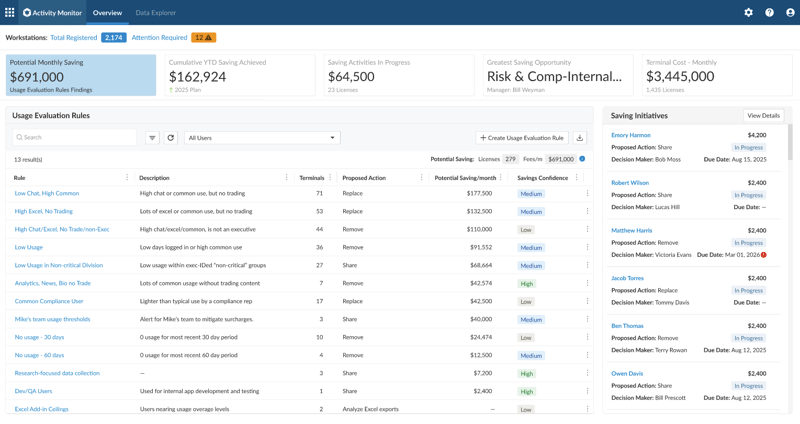
Turn raw usage data into actionable insight without data sifting or guesswork.
- Apply configurable rules to transform raw usage data into meaningful insights
- Use out-of-the-box profiling rules or create your own, with profiling by department, utilization or the data itself
Direct integration with
Optimize Spend
Bring cost and usage together in one view.
- Automatically link usage data to the right user, team and contract, without manual input
- Automatically refresh registered user profiles so usage records reflect current organizational structure and entitlements
Actionable reporting
Put the right evidence in front of the right stakeholders.
- Drill into per-user activity reports for detailed review
- Give decision-makers department and group-level overviews
Simple, secure deployment
Install and manage with minimal ongoing IT overhead.
- Lightweight, fully automated deployment
- Silent auto-updates with no user or IT intervention required
- Centralized logging and health monitoring out of the box
- Passive observation only, with no interference with tracked applications


